

View campaign progress
On the Overview tab of any running campaign, view a dashboard of the campaign’s progress and metrics.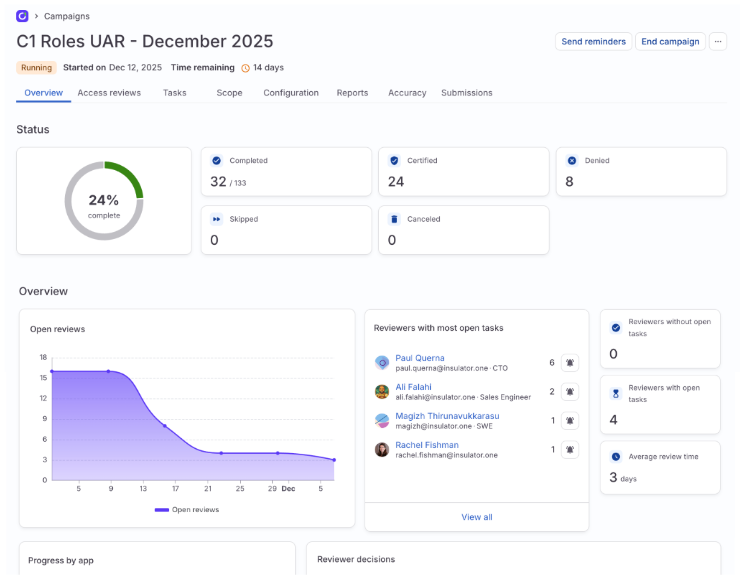
- Get a summary of the campaign’s progress and open tasks
- Track reviewer approval rates and average review time
- Remind reviewers to complete their open tasks
- Track review completion status by application
- View a burndown chart of the campaign’s remaining open reviews over time
View and manage individual reviews
On the campaign’s Tasks tab, you can filter the list of campaign tasks, open individual access reviews’ details panes, and take action:- Complete any tasks assigned to you
- See the status of the access review (completed, open)
- See the outcome of the access review (approved, denied)
- Reassign the review, if necessary
- Restart the review, if necessary
- Send the assigned reviewer a reminder notification
- Add comments
- View audit log history
- View related tasks
View review submissions
On the Submissions tab, you’ll find a log of review submissions by the reviewers assigned to complete tasks in your campaign. Each line in the submission log includes the submission date (hover over the date for an exact timestamp), and the count of submitted reviews, broken down by certifications and denials. Click the Generate CSV icon above the log to generate a downloadable report of all submission data.Send notifications
ConductorOne automates the process of notifying users about their open access reviews, reassignments, and impending deadlines.Automatic notifications
If the Campaign Owner has enabled campaign notifications, these notifications are sent automatically:| Notification | Time sent | Notes |
|---|---|---|
| Campaign kickoff | When the campaign starts | Sent to all users who have access reviews assigned to them for the campaign. Only sent if the Campaign Owner opts into sending this notification when starting the campaign. |
| Reminder of your open access reviews |
| Sent to all users who have uncompleted access reviews in the campaign. |
| Access review assignment | When a task is reassigned to a new user. | Sent to the user who is now assigned to the access review. |
| Campaign close | When the campaign ends | Sent to all users who were assigned access reviews for the campaign. |
On-demand notifications
To help remind users to complete their campaign access reviews, a Campaign Owner can also send the following notifications on demand at any time during the campaign:| Notification | Sent to | Notes |
|---|---|---|
| Complete your access reviews reminder | All users currently who have uncompleted access reviews in the campaign. | A campaign-wide reminder. Triggered by clicking Send reminders on the main campaign page. |
| Complete this access review reminder | The user currently assigned to a specific uncompleted access review. | A reminder sent to one individual about one task. Triggered by clicking … > Send reminder in the task details view. |
Manually end a campaign
Campaigns continue running past their scheduled end date unless configured to end automatically. A Campaign Owner or Super Administrator must manually end campaigns that aren’t set to auto-end. Click End campaign to finish and close an active campaign. Here’s what happens next:- If any reviews are outstanding, ending the campaign cancels those requests.
- When ending the campaign, you’ll be asked if remaining open reviews should be Skipped or Revoked.
- The completed campaign is automatically archived on the Completed tab on the Campaigns page.
Revoke access that was denied during the campaign
Once the campaign ends, you can manually start the process of revoking access to the entitlements that were denied during the campaign.Generate a campaign report
Access review campaigns have built-in reports that show the progress and prove the outcomes of the campaign. Reports can be generated at any time after a campaign has started. Campaigns and campaign templates can also be configured to auto-generate a campaign report when the campaign ends. To generate a report:Verify report hashes
If you need to verify the checksum of a downloaded report for auditing purposes, here’s what to do:Frequently asked questions about campaigns
If an access review campaign due date has passed, can a reviewer still complete their assigned tasks?
If an access review campaign due date has passed, can a reviewer still complete their assigned tasks?
- For reviewers: If a task is no longer available on the Reviews page, the campaign has ended and no action can be taken. The task can be viewed and comments added under Completed tasks.
- For campaign administrators: When it’s time to end a campaign (or when configuring an automatic campaign end), you will chose what action to take for any uncompleted tasks.
Can a reviewer reopen a task they've completed?
Can a reviewer reopen a task they've completed?
Can we delete or remove a task from an in-progress campaign?
Can we delete or remove a task from an in-progress campaign?
If a task is not automatically assigned to a reviewer and we don't have a fallback user defined in the policy, what happens to the task?
If a task is not automatically assigned to a reviewer and we don't have a fallback user defined in the policy, what happens to the task?
If someone leaves the company after the campaign has begun, what happens to review tasks about their access?
If someone leaves the company after the campaign has begun, what happens to review tasks about their access?